

 By Dr. Jim Dahle, WCI Founder
Required Minimum Distributions (RMDs) are mandatory withdrawals from retirement accounts such as 401(k)s, traditional IRAs, and 457(b)s. RMDs generally apply to account owners who are 73 or older (75 or older beginning in 2033); however, there are other situations where distributions must be taken including:
- Inherited retirement accounts
- IRA withdrawals under the Substantially Equal Periodic Payments (SEPP) provision for penalty-free withdrawals prior to age 59 1/2
- 457(b) withdrawals as per the plan requirements.
Starting at age 73, RMDs must be taken from tax-deferred 401(k)s, Roth 401(k)s, and tax-deferred IRAs, or the taxpayer must now pay 50% 25% (or 10% if fixed in less than 2 years) of the amount that should have been withdrawn as a penalty. Given that huge penalty, you don't want to forget to take your RMD. Since the market goes up most of the time and since it's better to enjoy tax-protected growth as long as possible, you generally want to wait as late in the year as possible to take the RMD. By the time December rolls around, it's time to get it done. While it is perfectly fine to spend your RMD (that's the whole point of saving for retirement, after all), it's not a requirement. You can just move it out of the IRA, pay the taxes on it, and reinvest it in your taxable account.
Required Minimum Distributions at Vanguard
If your IRA is at Vanguard, you'll be pleased to know that Vanguard has made this process pretty easy, even if the process seems to change slightly year to year. I'll walk you through the process using screenshots taken in 2025.
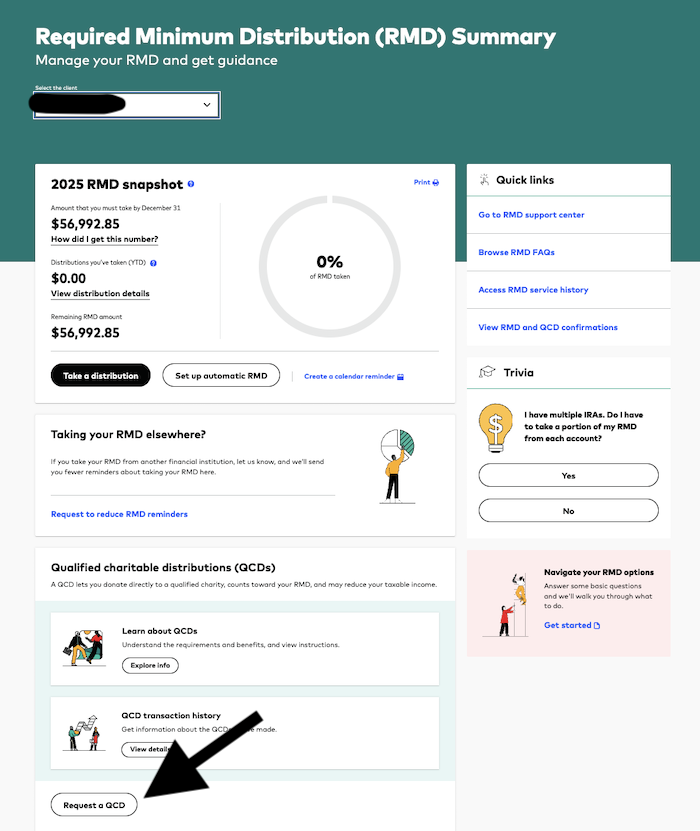
These instructions are particularly relevant if you want your RMD to go to your brokerage account at Vanguard, NOT your bank account. I noticed a slight tweak in 2025 when trying to move the RMD to the brokerage account. In this particular case, the senior had an RMD of $56,992.85 but wanted to do a Qualified Charitable Distribution (QCD) of $14,344, leaving $42,648.85 to take as an RMD.
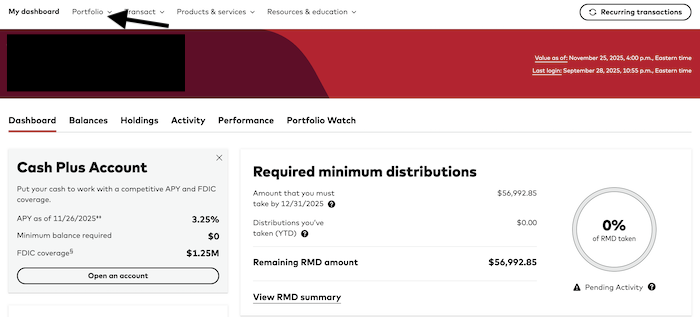
Start by going back to the main page after you log in. Go to “Portfolio” (black arrow) and get the drop down menu. Note that if you're of RMD age, you may have the “Required minimum distribution” section there front and center. Thanks Vanguard! Very helpful.
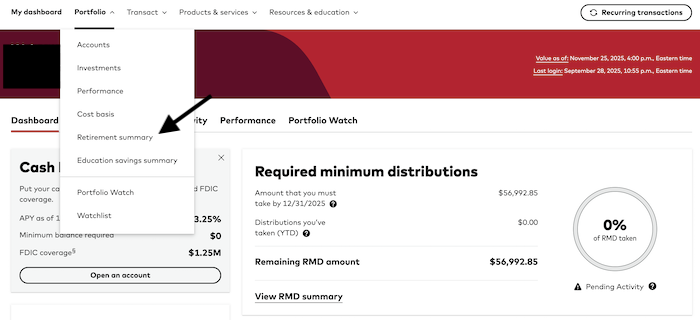
Again select “Retirement summary” (black arrow).
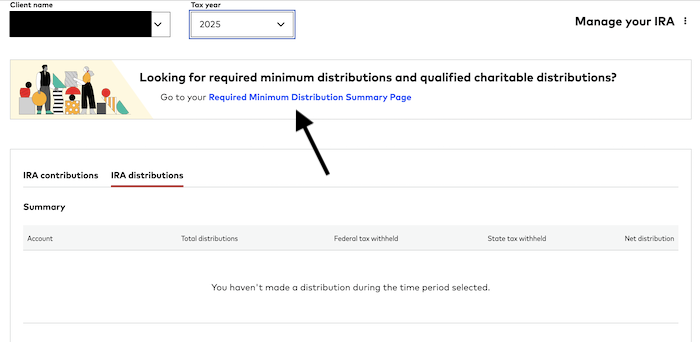
Next check that the name and the year for the RMD you want to take are right, then click on the “Required Minimum Distribution Summary Page” links (black arrow).
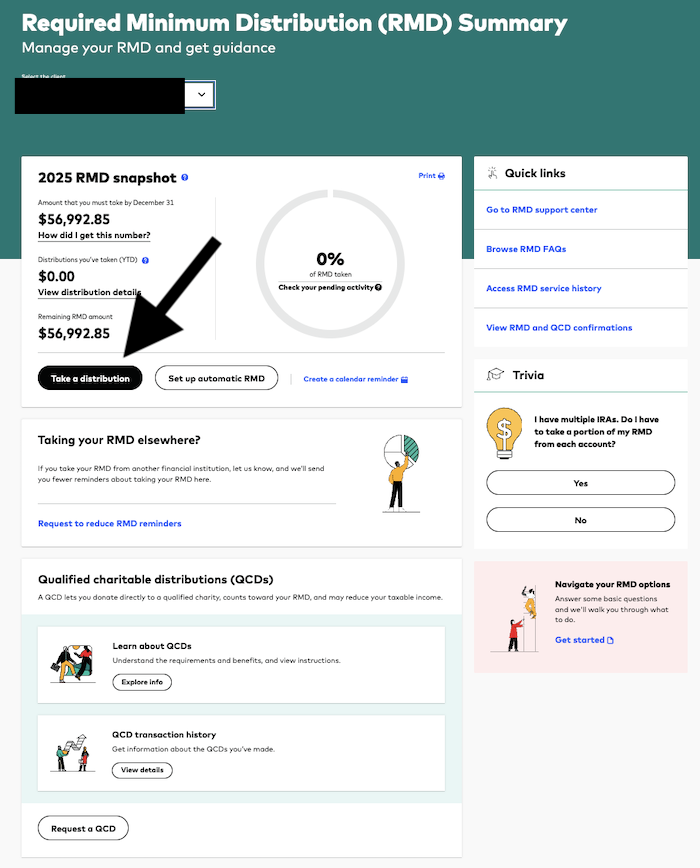
Click on the “Take a distribution” button (black arrow).
Select the fund or funds from which you wish to take the distribution. In this case, I chose to just take it from cash, then rebalance the portfolio a day or two later. I could have done all the rebalancing by taking varying amounts from each of the funds in the account, but that seemed overly complicated. Hit the radio button next to your chosen fund (black arrow) then hit the “Continue” button (red arrow.)

On the next page, choose a specific dollar amount (black arrow), put it in the box (red arrow), and then hit the “Continue order” button (green arrow).

Here's where things got interesting in 2025. If you want to move your RMD to a bank account, no problem, this would work fine. You just check the radio button next to “Yes, take an IRA distribution and send the money to a bank account” (black arrow), choose your linked bank account (red arrow), make sure you're good with the tax withholding choice, and hit the “Preview order” button (green arrow).
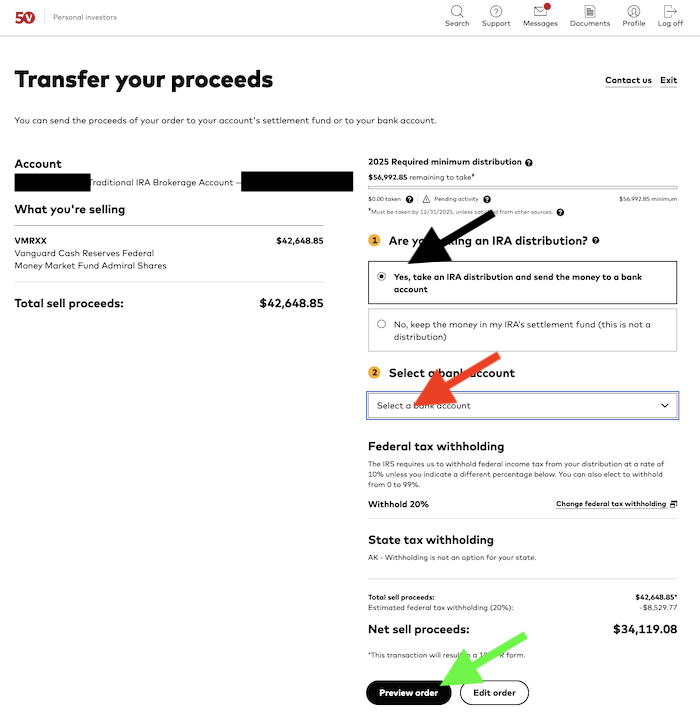
But I didn't want to move the money to a bank account. I wanted to move it to the brokerage account and it wouldn't let me. It's also worth noting that despite the fact that I had already put in a QCD order earlier in the same day, the website was still telling me no RMD had been taken for this account yet. That doesn't update until the next day. Bottom line is that I realized this wasn't going to work. So I went back out to the main page, aka the dashboard. Then I scrolled down the left side to the traditional IRA account I wanted to take an RMD from, opened the “Transact” menu and clicked on “Exchange funds” (black arrow).
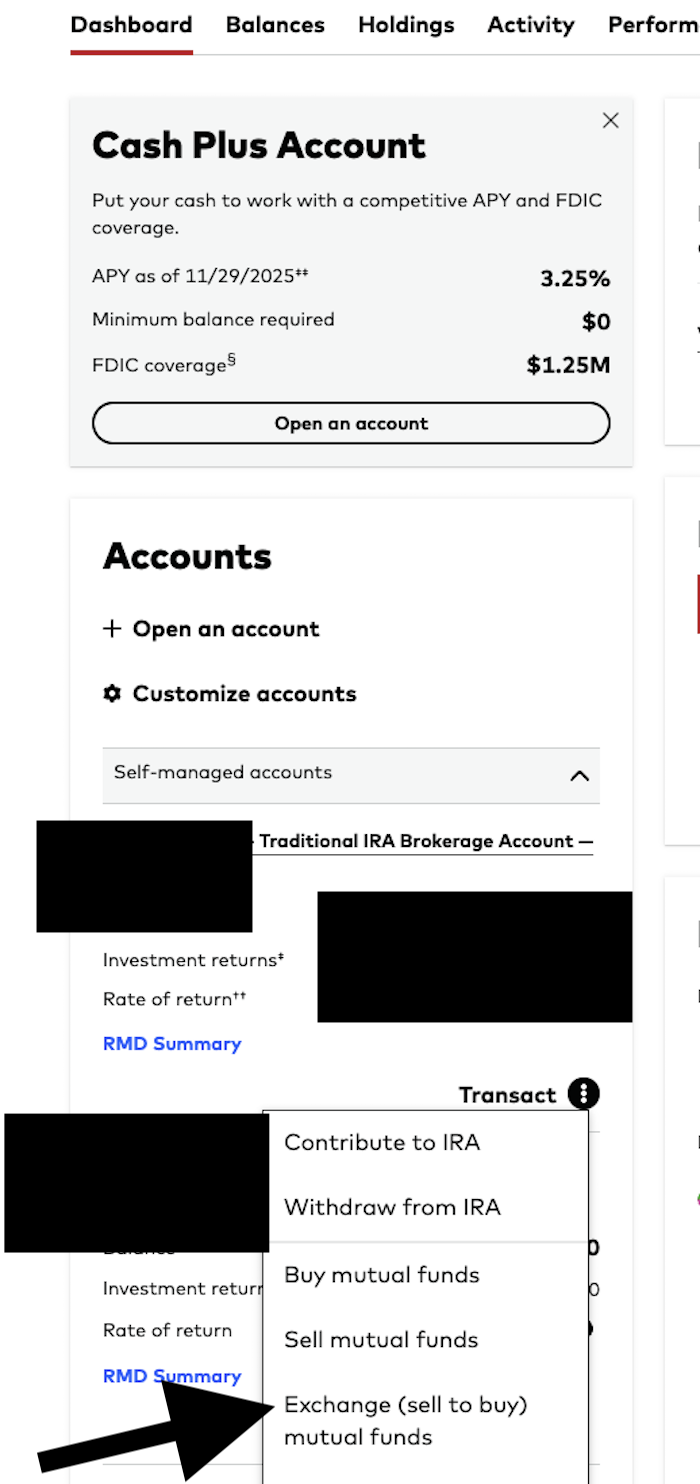
Actually, that's probably what I should have done. What I actually did was click “sell mutual funds”, which took me here:
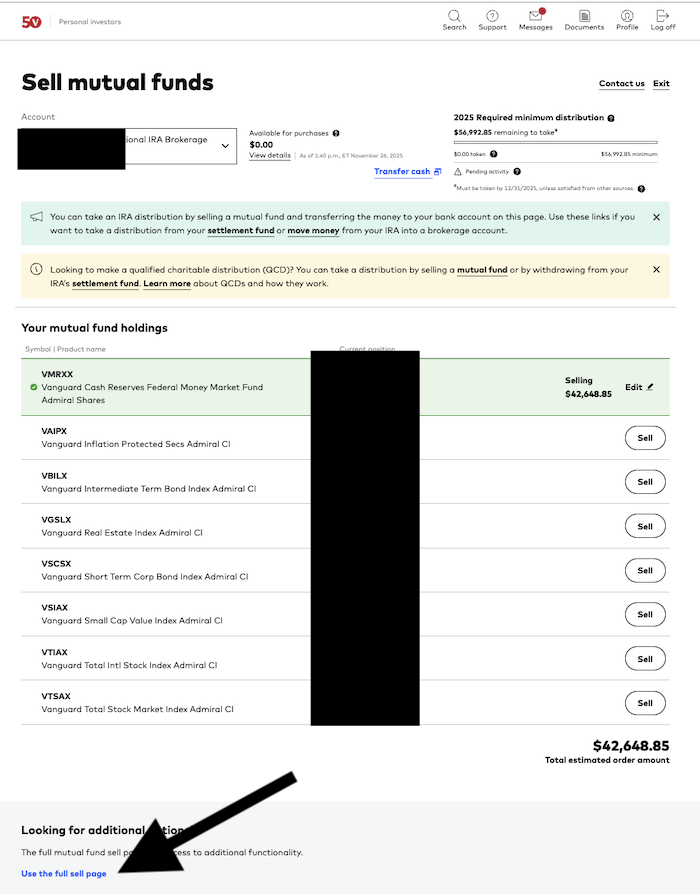
Realizing this wasn't quite where I wanted to be, I saw the link I wanted, the “Use the full sell page” link. I don't know why Vanguard does this sort of thing. I guess to try to make things simpler for people, but in reality I think it just makes it more complicated. I needed more options, so I figured the “full sell” page would work and I was right. That link takes you here:

Choose “Sell in dollars” (black arrow), select the fund you want to sell and put the amount of the RMD in (red arrow) and then hit the “Continue” button (green arrow).

There's the option we're looking for, “Exchange to another fund”. Hit that and continue and you will arrive here:
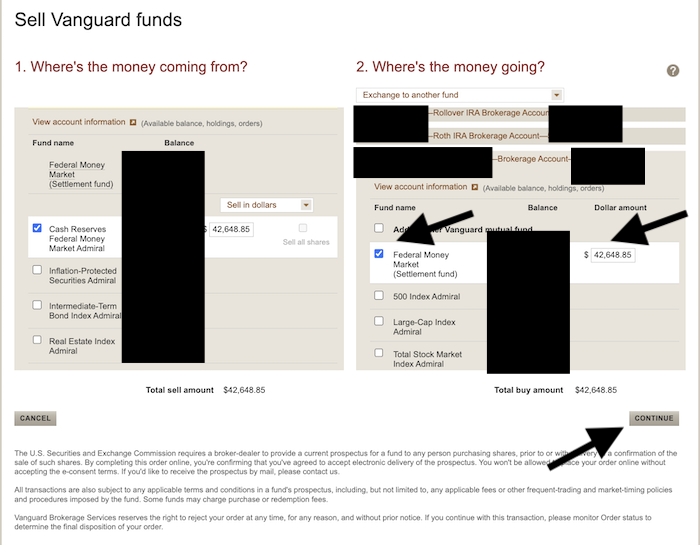
Now I can choose a fund in the brokerage account, put in the RMD amount, and hit “Continue” (black arrows).
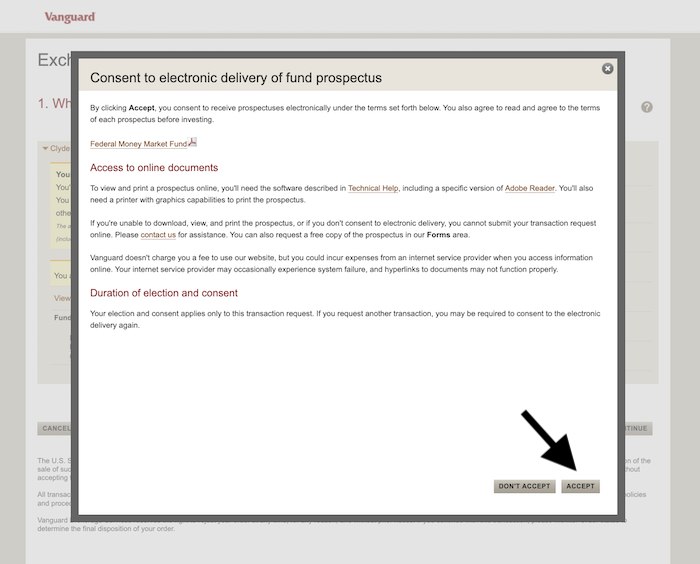
Accept delivery of the electronic version of the fund prospectus if necessary by hitting “Accept” (black arrow).
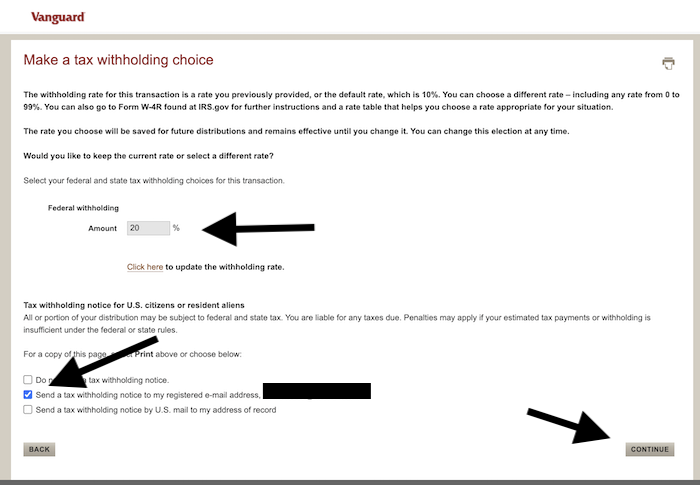
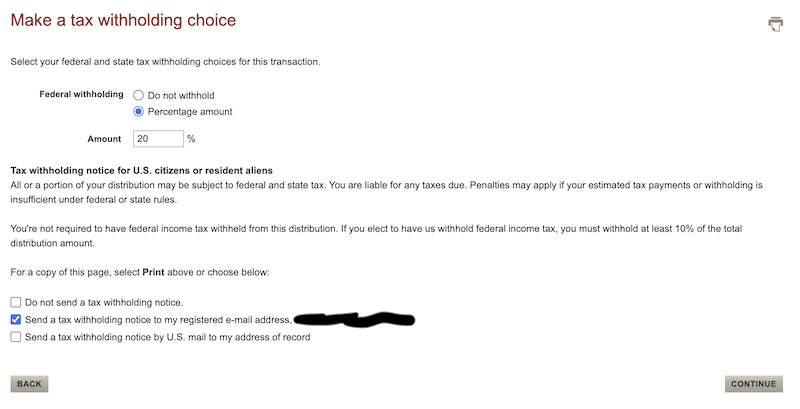
Now it's time to talk about tax withholding notices. While I don't think anyone wants money withheld from a QCD for taxes that aren't due, lots of people have money withheld from their RMDs. In fact, if you take your RMD late in the year as many do, this is a great way to not loan the IRS a bunch of extra money at 0%. Instead of making quarterly estimated payments, you can just pay a big chunk of or even your entire annual tax bill by using RMD withholding in December. The IRS doesn't care when money is withheld, but they do care when quarterly estimated payments are made. Whether you have money withheld in January or December, it's all the same to the IRS whether it is withheld from paychecks, pension checks, Social Security checks, or RMDs. In this case, a decision was made to withhold 20% for taxes. Then you have to hit a radio button to determine if and how you want a notice that this was done and hit the “Continue” button (black arrows).
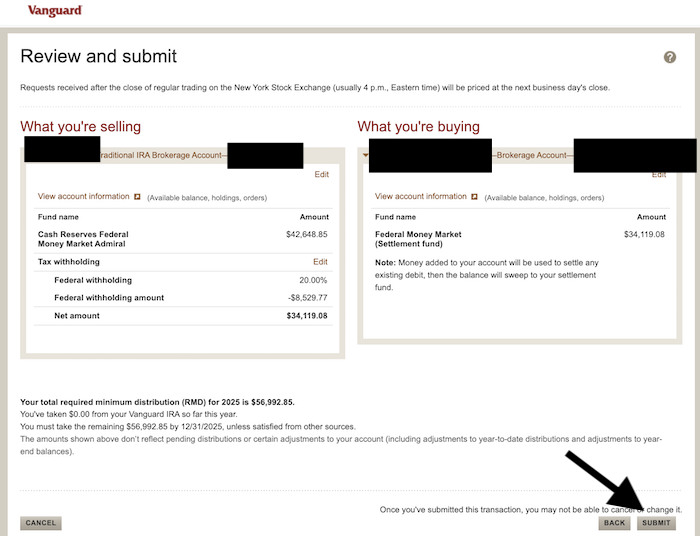
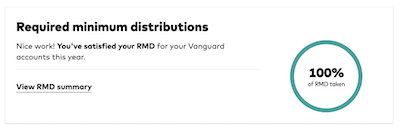
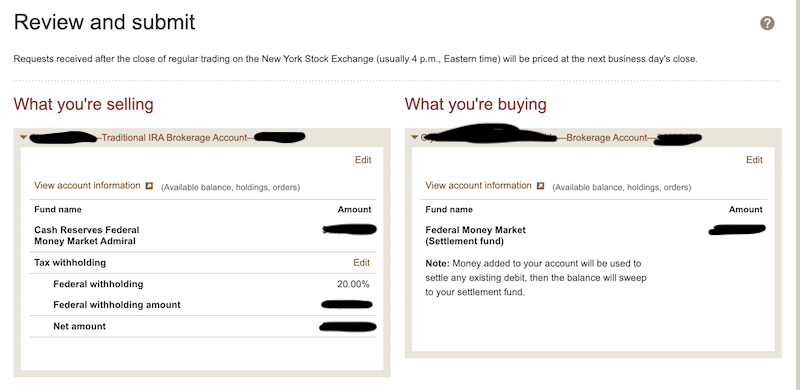
Now you're to the review page. If it all looks right, hit submit and the confirmation page will look similar. Note that the notice from Vanguard is still saying none of the RMD has yet been taken. But if you go back the next business day, you'll see this:
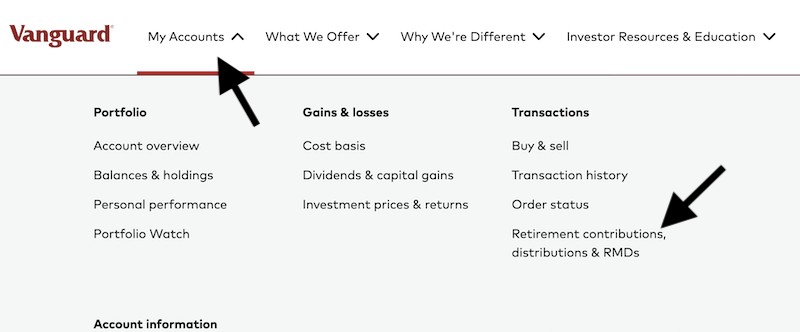
First, log into your account. Then, click on “My Accounts” to open up a big menu and click the link labeled “Retirement contributions, distributions & RMDs.”
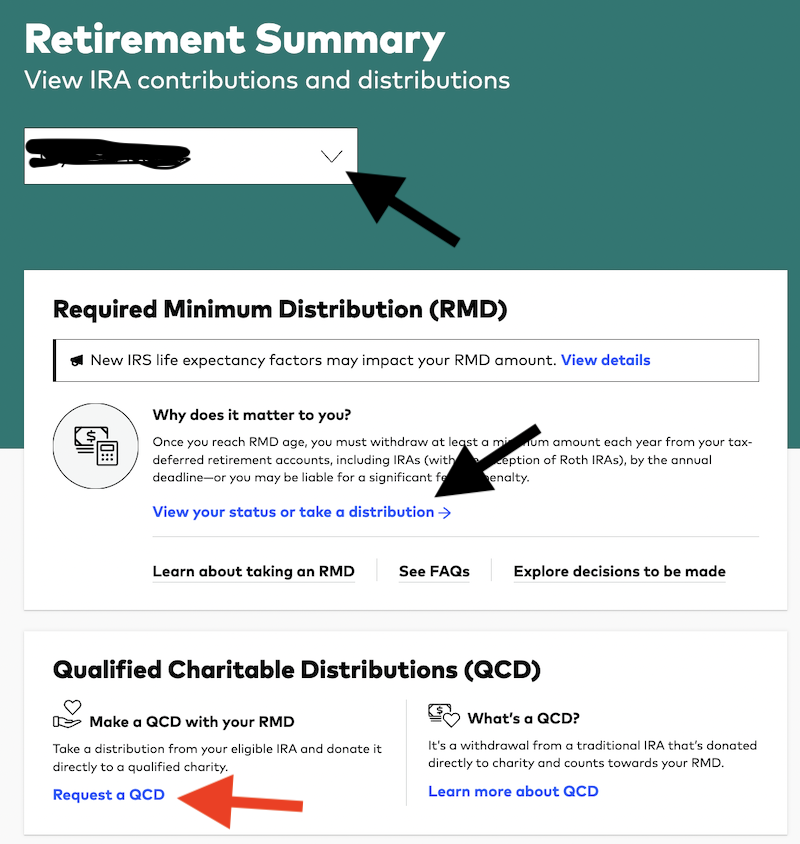
Now you arrive at the RMD screen. Here you can select which person's accounts to look at (yours or your spouse's); if you try to take an RMD from your spouse's account, you will find that you need to log directly into their account to do so. Then, click on the link labeled “View your status or take a distribution.” Incidentally, this is also where you branch off to do a Qualified Charitable Distribution (QCD)—a special type of RMD where your RMD goes directly to a charity, allowing you to donate with pre-tax dollars even if you don't itemize. A QCD counts toward your RMD amount, and it can even be your entire RMD.
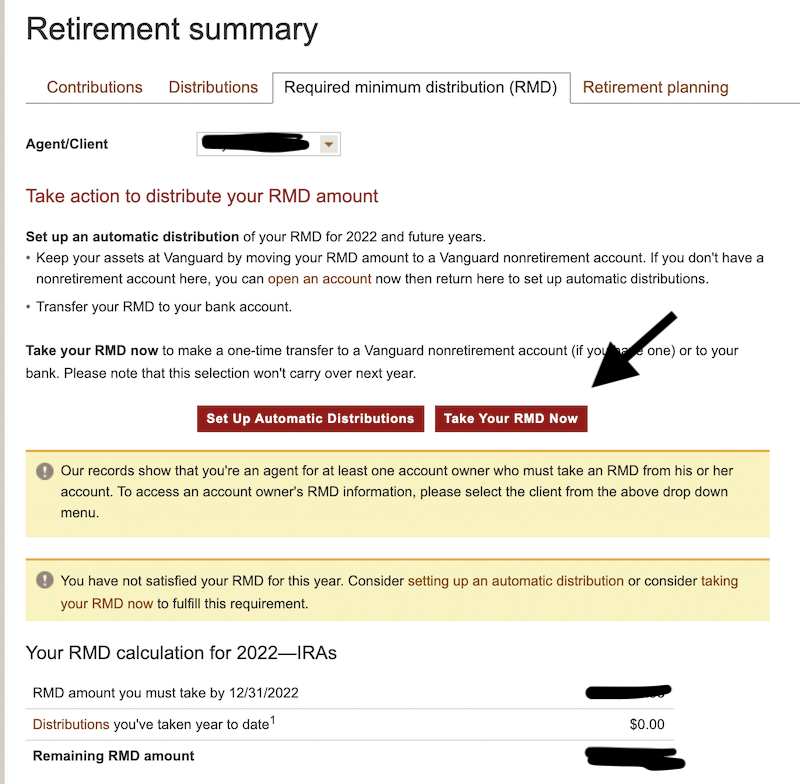
On the next page, Vanguard will tell you what your RMD is for the current year. It's simply the IRA balance divided by a factor from an age-based table. If you had a $1 million IRA at the end of the year before you turned 73, your RMD this year would be $1 million/26.5 = $37,736, or just under 4%. By the time you are 90, that withdrawal percentage will be more than 8%. Note that you can also set up automatic withdrawals on this page. This is helpful if you want a certain amount each quarter on which to live or if you just want to set it up early so you don't forget.
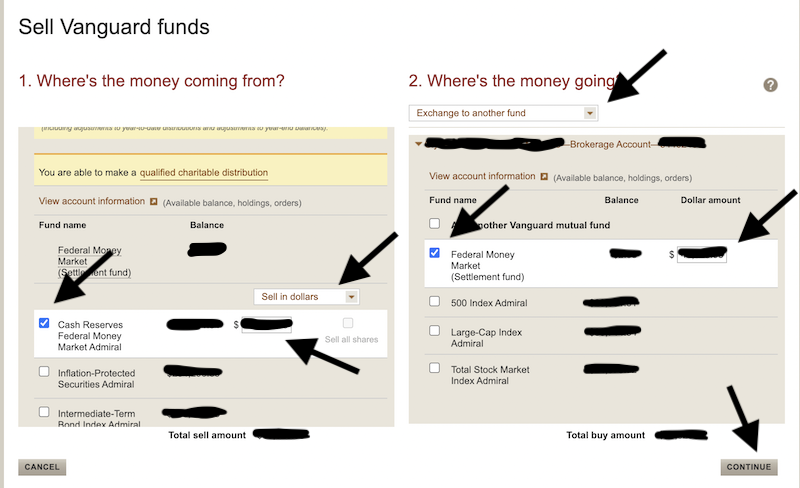
Next, you get to the typical screen where you make transactions at Vanguard, at least with mutual funds. Simply choose the fund you are going to take the RMD from, the amount, and then choose where the RMD is going to go. You can send yourself a check, move it to your bank, or just move it over to your taxable account as is demonstrated here by selecting “Exchange to another fund” in the drop-down menu. Hit the checkbox next to that fund in your taxable account. Then hit “Continue.”
Next is the withholding page. You can either have nothing withheld (generally my preference since I pay quarterly estimated taxes anyway), you can have enough withheld to cover the taxes due on the RMD, or you can have even more conveniently withheld to help cover the cost of your taxes on other income. It's really up to you. If you want taxes withheld, check the box and choose a percentage. Note that Vanguard won't withhold less than 10%. This amount will be reported to you (and the IRS) on your Vanguard 1099. Then, you check a radio button next to how you want records sent to you for this transaction. Then hit, “Continue.”
Then, you're on the final “Are you really sure you want to do this?” page. Make sure it all looks good and submit it.
Easy, peasy.
Qualified Charitable Distributions at Vanguard
What if you wanted to do a Qualified Charitable Distribution (QCD) as all or part of your RMD? No problem. Simply start over (or do this first).
The first step is to log into your Vanguard personal account. You then go up to the top set of menus, click on “Portfolio” (red arrow) and then down to “Retirement summary” (black arrow).

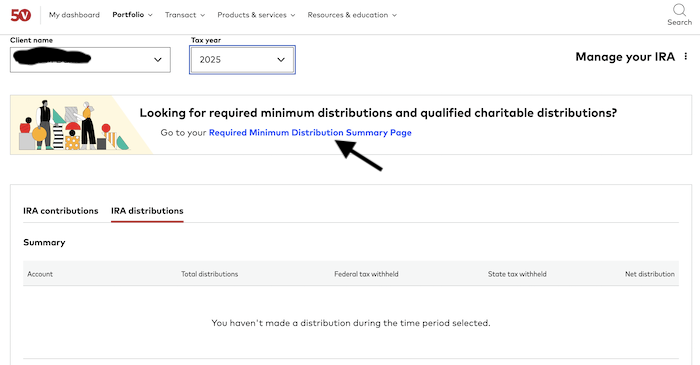
Make sure the client name and tax year are accurate, then click on “Required Minimum Distribution Summary Page” (black arrow).
Now click the “Request a QCD” button, way at the bottom left.
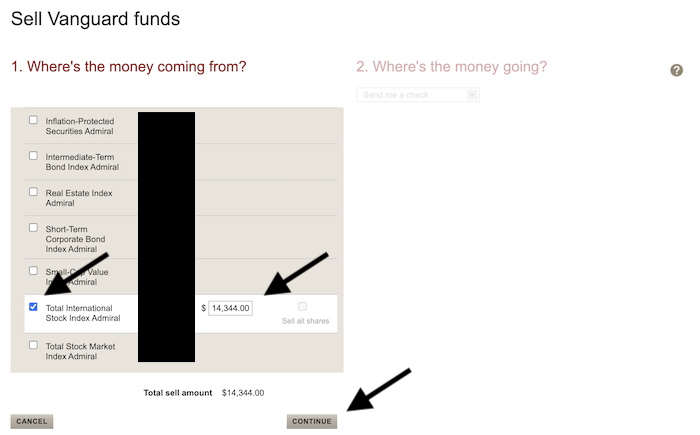
Next, select the fund you wish to take the QCD from (in this case, I simply selected a fund I knew had more than its allotted percentage and would need some shares sold in order to rebalance), put in the amount you wish to give of a QCD, and then hit the “CONTINUE” button (all black arrows). Note that you can take a QCD from more than one fund all in one step here.
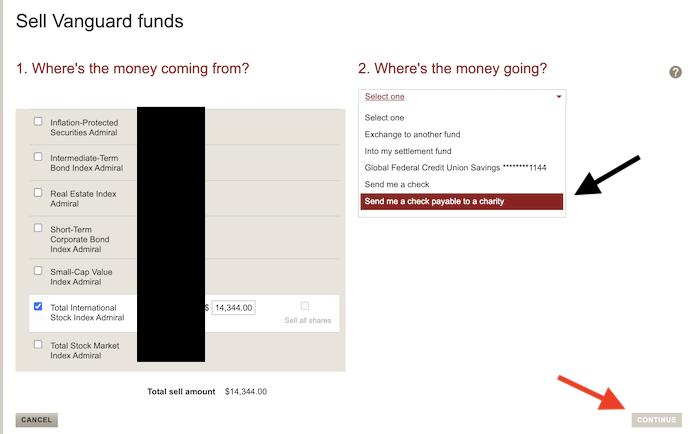
Once you hit continue, the page changes to allow you to also interact with the right side. Use the menu on the right, scroll down to “Send me a check payable to a charity” and select it (black arrow), then hit the “CONTINUE” button (red arrow).
When the informational screen pops up, hit the “OK” button (black arrow).
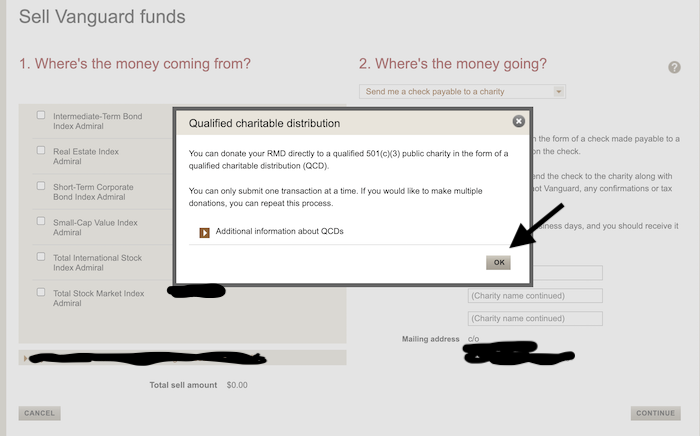
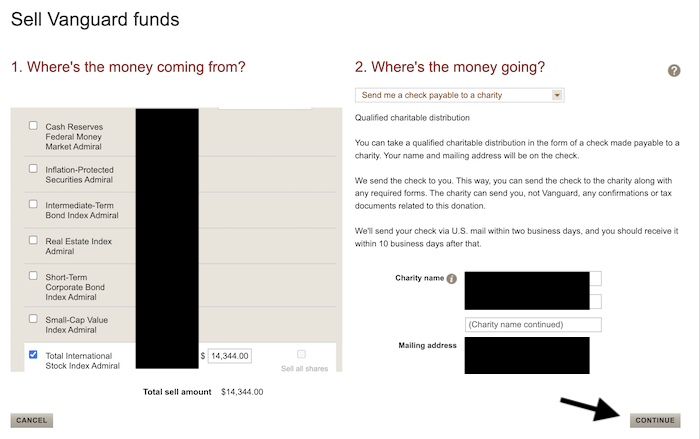
Note a couple of things here. First, Vanguard's goofy IT interface often makes you restart the left side at this point, so you might have to select the fund again and/or put in the amount of the QCD again. Don't be surprised, it happens a lot. Second, Vanguard will use your default mailing address to send the check to. I don't think you can change this without changing your default mailing address. It's a security thing. Type in the name of your chosen charity (and make sure it's a legitimate charity as far as the IRS is concerned, Vanguard won't check for you, they'll just put what you put in that box on the check and send it to you). Then hit continue (black arrow).
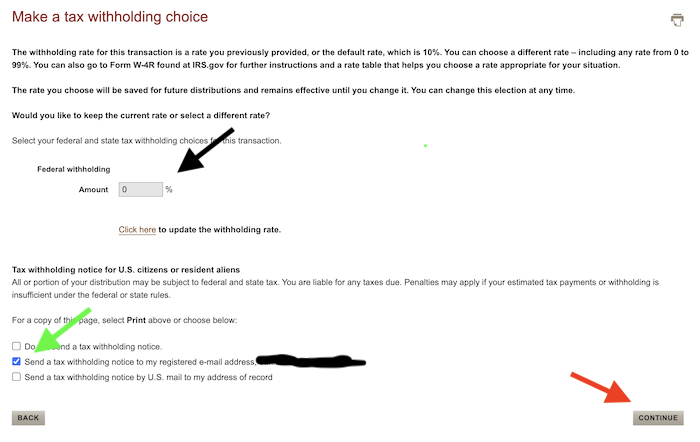
Next you go to the tax withholding page, which is the same as what you see at this point in the RMD process. I don't think most will withhold part of their QCD for taxes, but it is an option if you like. If I were you, I'd set this to 0% (black arrow), then select how you want the notice sent, if any (green arrow), before hitting “CONTINUE” (red arrow).
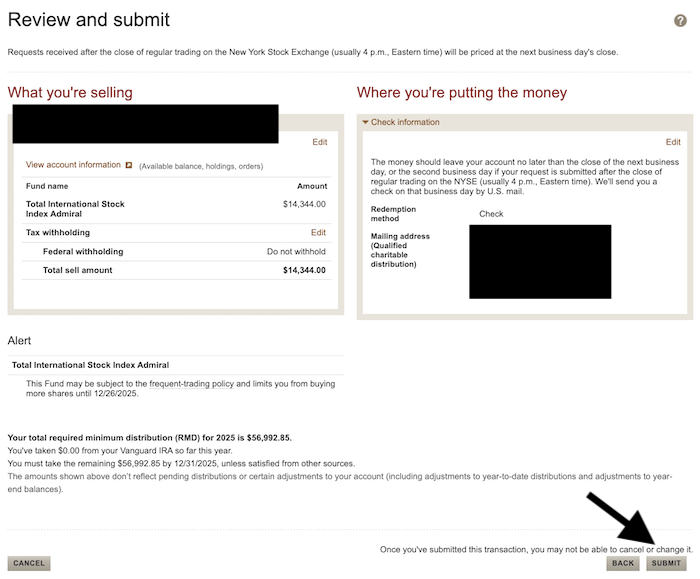
Next is the review page, which should look pretty familiar to you. Double check everything, then hit the “SUBMIT” button (black arrow).
The next page is just the confirmation page.
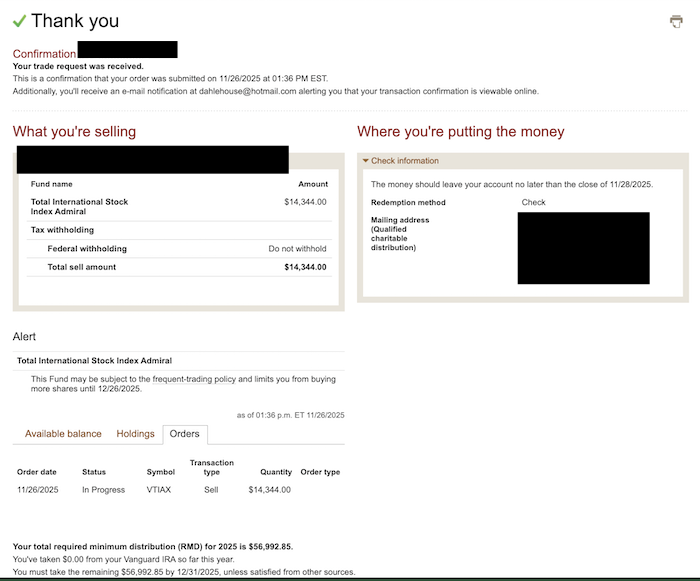
That's it. In a week or so, the check will show up in the mail and you can hand deliver or mail it to your chosen charity. You can do more than one of these, just follow the same process.
Be aware that if you put in the QCD transaction before the remainder of the RMD, you'll need to manually subtract that amount from the RMD because Vanguard does not instantly update the amount of RMD you have already taken for the year (in the form of a QCD). If you check back in a few days, it should be all updated.
Interestingly, QCD law was put in place when the RMD age was 70 1/2, so you can take QCDs before you're actually required to take RMDs. The age 70 1/2 rule applies to inherited IRAs as well.
Taking RMDs (and QCDs) at Vanguard isn't too bad. Just follow the instructions, and you shouldn't have any huge issues, but if you do, just pick up your phone and call and they'll walk you through it. The most important thing is to just remember to do it. If you forget, you'll pay a huge penalty that will keep you from ever forgetting again. If you pay it twice, it's probably worth hiring a financial advisor to assist you. The penalty would more than cover their cost!
What do you think? Are you taking RMDs? How do you take them?